Clipboard Malware Address Swap vs Address Poisoning: Two USDT Loss Paths
Clipboard clippers and address poisoning both create wrong-destination USDT sends. Verify on hardware screens; classify the path before IR.

Two USDT loss paths look similar on a transaction history and feel identical to a panicked trader - “I sent to the wrong address” - but they are different attack planes with different detection and different freeze odds. Address poisoning plants lookalike dust in your on-chain history so you copy the attacker’s address from a past tx. Clipboard / clipper malware infects the host OS and swaps the paste buffer in real time when you copy a real address. Neither is an issuer blacklist. Both can still justify a lawful freeze-request fork when funds land on freezeable rails.
Educational only. Not legal advice. Not malware how-to. FreezeRadar does not distribute detection tools that weaponize clippers and does not help evade freezes.

Check a wallet before you act
Run a FreezeRadar scan for issuer-freeze signals, sanctions exposure, counterparty risk, and freezeable asset sensitivity before moving funds.
Direct answer
Crypto clipboard malware replaces a copied wallet address in the OS clipboard with an attacker-controlled lookalike; address poisoning never needs host malware - it abuses your explorer history. Desk rule: verify the destination on a hardware wallet screen or a second offline channel before signing, and never trust “recent” history copy-paste alone. After a loss, classify the path first - malware cleanup vs history discipline - then apply the same evidence packet if funds hit VASPs or remaining thief balances look freezeable. See also address poisoning freeze-request path for the poisoning-only deep dive; this article owns the matrix.
Matrix: three ways the wrong address wins
| Path | Where it lives | Typical tell | Primary control |
|---|---|---|---|
| Address poisoning | On-chain dust / zero-value txs from lookalike addresses | History shows a “familiar” prefix/suffix; middle digits differ | Never copy from history; compare full string; bookmark counterparties |
| Clipboard clipper | Host malware (Windows/macOS/Android) | Paste differs from what you copied; often swaps only when crypto-shaped strings detected | Hardware-screen verify; keep signing machines clean; avoid unknown APKs |
| Human wrong-paste | Operator error, no adversary | Chat / ticket paste mismatch | Dual control for large sends; read-back of last 6 + first 6 |
Glossary anchors: address poisoning, scam address.
Clipboard / clipper behavior (detection, not construction)
Public industry write-ups (Microsoft Security on Tor-enabled clippers, OAK technique catalog entries for clipboard hijack, Kaspersky/Cyble consumer advisories) describe the same victim-visible pattern: a process monitors the clipboard for blockchain address formats and substitutes an attacker address, sometimes with matching prefix/suffix to survive a glance check. Worm-like propagation and persistence vary by family - operators do not need those internals to triage.
Victim-visible checks desks can run without malware expertise:
- Copy a known deposit address from your allowlist doc.
- Paste into a plaintext editor immediately.
- Diff against the allowlist. If it changed without you editing, treat the endpoint as hostile.
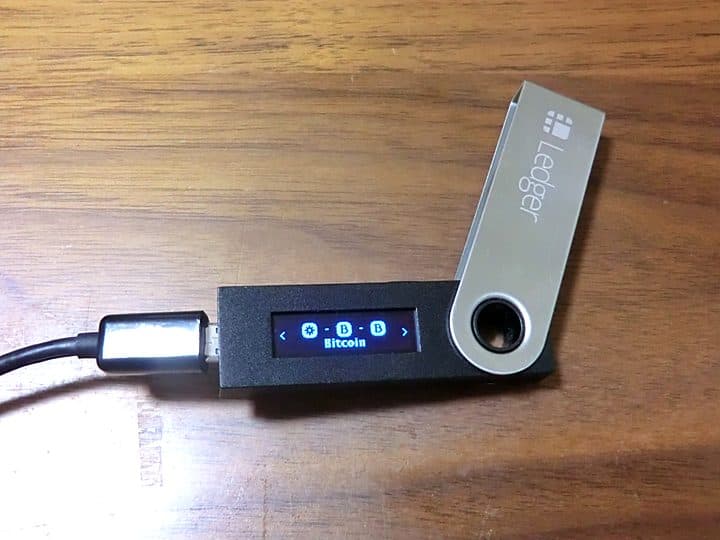
- On hardware wallets, confirm the address glyphs on-device match the allowlist - not the laptop screen alone.
- Quarantine the machine; rotate hot-wallet keys that signed from it; assume any seed typed on that host is burned (seed vs freeze).
Do not download random “clipper removers” from search ads - that is a common second-stage lure.
Address poisoning (short form)
Attacker sends dust or 0-value transfers from an address crafted to share opening/closing characters with a real counterparty. Later you open the explorer, copy “the address you used last time,” and feed the poison. Full treatment - including freeze-request odds when the lookalike still holds funds - lives in the poisoning freeze-request path. Here the only desk rule required: history is not an address book.
Freeze-request fork after either loss
Once USDT left, classification still matters for IR, but escalation rhymes:
- Capture the intended destination (allowlist, invoice, ticket) and the actual destination from the signed tx.
- Screenshot clipboard diffs or poisoned history rows.
- Trace hops; note exchange deposits.
- File LE; open VASP tickets; consider issuer paths for residual freezeable balances - same lawful stack as other thefts.
- For clipper cases, add endpoint forensics notes (hostname, OS, when malware suspected) - without pasting proprietary EDR dumps into public tickets.
Hardware custody reduces clipper impact for signing if addresses are verified on-device, but it does not stop poisoning if operators still copy from history into the device entry flow carelessly. Pair with hardware vs software freeze risk for custody myths.
Worked composites
Clipper: Ops paste a Binance deposit address from the venue UI into a desktop wallet. On-device screen shows a different T-address sharing the first four and last four characters. They abort. Clipboard diff confirms substitution. Action: wipe/reimage, move funds from a clean machine, report. No loss.
Poisoning: Trader copies “last OTC counterparty” from Tronscan history, sends 75k USDT, realizes middle digits differ. isBlackListed false on both sides. Action: evidence packet, LE, exchange tickets on thief deposit hops - not a malware reimage (unless concurrent indicators exist).
Mixed: Clipper installed and poisoned history present. Classify both; fix endpoint first so the next send is not also swapped.
Desk controls that survive both attacks
- Maintain an out-of-band address book (signed PDF, HSM allowlist, ticket system) - not explorer history.
- Dual-control above a notional threshold: second human reads full address.
- Hardware-screen verification mandatory for treasury.
- Separate browsing machines from signing machines where scale allows.
- Train that “prefix match” is an attacker feature, not a safety check.
Limitations
FreezeRadar and explorers show where funds went and whether addresses are issuer-blacklisted. They cannot prove clipper presence on a laptop, cannot guarantee LE freezes a lookalike balance, and cannot reconstruct a clipboard event after the fact without host logs. This article intentionally omits exploit construction details.
Key takeaway
Poisoning is an on-chain social trick; clippers are host malware. Verify destinations on trusted screens, never from history alone, and after a loss run the lawful freeze-request stack - not a second paste into a “recovery” site.
Next: address poisoning path, evidence packet, hardware freeze risk, glossary address poisoning / scam address.
Operator FAQ (short answers)
Can issuer blacklist reverse a wrong-send? No. A freeze on the destination may preserve remaining balance for LE processes; it does not rewrite your signed transfer.
Does hardware stop clippers? It stops blind laptop confirmation if you actually read the device screen. It does not stop you from entering a poisoned address into the device.
Is a prefix match enough? No. Attackers optimize for prefix/suffix resemblance precisely because humans check ends.
Should we reimage after every wrong-send? Reimage when clipboard diffs, EDR alerts, or unknown APKs appear. Pure poisoning with a clean host may not need reimage - but verify before assuming purity.
Where do FreezeRadar scores fit? Use them to screen counterparties and staging wallets before the next settle - not as proof of why yesterday’s paste failed.
References
- Microsoft Security Blog - Crypto clipper research (Tor / worm-like propagation) - https://www.microsoft.com/en-us/security/blog/2026/06/17/crypto-clipper-uses-tor-worm-like-propagation-for-persistence-control/
- OAK - Clipboard-Hijacker (Clipper) Address technique - https://onchainattack.org/technique/OAK-T4.012/
- FreezeRadar - Address poisoning USDT freeze-request path - https://freezeradar.com/blog/address-poisoning-usdt-freeze-request-path
- FBI IC3 - https://www.ic3.gov/
- Tether TRC-20 USDT (explorer reads for destination checks) - https://tronscan.org/#/token20/TR7NHqjeKQxGTCi8q8ZY4pL8otSzgjLj6t
Why freeze odds differ by path
Poisoning and clippers both create an irreversible signed send if you confirm the wrong destination. Freeze utility depends on where funds sit afterward, not on which trick fooled you:
- Still on a thief EOA with transferable USDT → issuer + LE packet may matter.
- Already swept to a tagged CEX deposit → VASP LERS / fraud ticket is first-hour priority (exchange freeze request when stolen USDT lands once published; until then use the evidence packet + contact guide).
- Bridged / mixed / OTC’d into fiat → on-chain freeze odds collapse; classical financial crime process takes over.
- Instant onward hop to many peel-chain addresses → preservation still worth attempting on major hubs, but expectations must stay honest.
Issuer isBlackListed on the victim address after a wrong-send is usually false - you successfully sent. Checking the destination blacklist status tells you whether funds are already immobilized for someone else’s reason, which changes recovery math but does not undo your signature.
Pre-send five-second ritual (treasury)
- Open allowlist entry (ticket ID, counterparty legal name, chain, full address).
- Enter address into signing wallet from that allowlist - not from explorer history, not from chat.
- On hardware: compare full address on device screen to allowlist print/PDF.
- Compare amount and token contract.
- Second operator says first six and last six aloud.
- Only then confirm.
Clipper survivors often catch the swap at step 3. Poisoning survivors catch it when step 1 was skipped.
Incident timeline template
- T+0: suspected wrong destination
- T+5m: halt further sends from the signing host; snapshot clipboard if intact
- T+15m: pull explorer trail; classify poisoning vs clipper vs human error
- T+30m: LE intake started; VASP tickets drafted
- T+1h: endpoint quarantine decision (mandatory if clipper indicators)
- T+same day: customer/comms plain-language update without promising clawback
Document waivers if any step is skipped so post-mortems stay honest.
Sources (5)
Microsoft Security — Crypto clipper research
Microsoft
Clipper malware public research.
OAK — Clipboard-Hijacker technique
OAK
Technique catalog for clipboard address swap.
FreezeRadar — Address poisoning freeze-request path
FreezeRadar
Poisoning-only deep dive.
FBI IC3
FBI IC3
Theft reporting.
Tronscan TRC-20 USDT
Tronscan
Destination verification reads.
Related reading
Continue exploring FreezeRadar knowledge content.

On this page
Get posts like this by email
A daily or weekly digest of FreezeRadar freeze activity.
By FreezeRadar Team
Wallet risk intelligence and stablecoin compliance analysis from FreezeRadar.